
Which Website Platform Is Best for Winning in AI Search?
We tested 27 live Astro, WordPress, Next.js, Shopify and Lovable sites to see what AI crawlers can actually read.

The short answer: the best website platform for winning in AI search is the one that puts your content in plain HTML. For AI search visibility, the brand of platform matters less than one technical question: is your content in the HTML your server sends, before any JavaScript runs? ChatGPT, Claude and Perplexity's crawlers read raw HTML and do not execute JavaScript. Astro and well-built Next.js and WordPress sites pass that test by default. Shopify stores pass on core product content but often hide reviews, product grids and app content behind JavaScript. Lovable sites built since May 2026 are server-rendered, but we still found live Lovable pages that show AI crawlers nothing but a loading spinner.
We didn't want to write another opinion piece, so we tested it. On November 13, 2026, we fetched 27 live websites built on Astro, WordPress, Next.js, Shopify and Lovable the way an AI crawler does, then compared that with what a person sees in a browser. The results, and what they mean for your platform choice, are below.
Key takeaways
Most AI crawlers (GPTBot, OAI-SearchBot, ClaudeBot, PerplexityBot) do not run JavaScript. If your content only appears after JavaScript runs, AI search engines can't see it.
In our test, Astro and Next.js homepages had a median of 100% of their content readable without JavaScript, WordPress 98%, Lovable 83% and Shopify 64.5%.
The platform sets the default. How the site is built decides the result. Every platform had both clean and leaky sites.
Shopify has the strongest AI shopping channel: its Catalog feeds products straight into ChatGPT and Copilot, without relying on your HTML at all.
No platform makes AI recommend you. It only decides whether AI can read you. Content, structured data and brand mentions do the rest.
Why your website platform matters for AI search visibility
AI search optimization, also called Generative Engine Optimization (GEO) or Answer Engine Optimization (AEO), starts with access: an AI engine can only cite or recommend what it can read. Traditional search engine optimization (SEO) had a safety net: Googlebot renders JavaScript. If your content loaded late, Google usually caught it on a second pass.
AI search doesn't have that net. The most-cited evidence is a crawl-log study by Vercel and MERJ, which found that none of the major AI crawlers render JavaScript, including OpenAI's GPTBot, OAI-SearchBot and ChatGPT-User, Anthropic's ClaudeBot, Meta's crawler and ByteDance's Bytespider. They do download JavaScript files (about 11.5% of GPTBot's requests and 23.84% of ClaudeBot's), but they never execute them. The scale is not small either: GPTBot made 569 million requests across Vercel's network in one month, and Claude's crawler 370 million.
Google's own AI features are the exception. Gemini and AI Overviews draw on Googlebot's rendering, so JavaScript content can still reach Google's AI surfaces. But ChatGPT Search, Claude and Perplexity AI read only what your server sends when they fetch your page for real-time retrieval, and that is the material their AI-generated answers are built from.
That gives us a simple, measurable test for any platform: how much of the page is in the raw HTML?
We tested 27 live websites. Here's what AI bots actually see
How we tested. For each site we did two things:
Fetched the homepage with GPTBot's user agent and no JavaScript, then counted the visible words in the raw HTML. This is what a non-JavaScript AI crawler gets.
Loaded the same page in headless Chrome with JavaScript on, waited for it to finish, and counted again. This is what a visitor (and Googlebot) gets.
The score is the share of the rendered page's words that were already in the raw HTML. We confirmed each site's platform from its code (for example /_astro/, /wp-content/, /_next/, cdn.shopify.com, or TanStack Start's $_TSR marker on Lovable sites).
Figure 1
How much of each page can an AI crawler read?
Each dot is one live homepage. Share of the page's visible words already in the raw HTML (what GPTBot can read). Black line marks the median.
| Platform | Sites tested | Median share readable without JavaScript | Range |
|---|---|---|---|
| Astro | 4 | 100% | 100% to 100% |
| Next.js | 5 | 100% | 95% to 100% |
| WordPress | 6 | 98% | 92% to 100% |
| Lovable | 6 | 83% | 0% to 100% |
| Shopify | 6 | 64.5% | 22% to 99% |
Two sites were excluded because they blocked our test rather than failing it: a WordPress blog returned "429 Too Many Requests" to the GPTBot user agent, and a Next.js app blocked our server's IP address. A third, a major publisher, answered GPTBot with "402 Payment Required". That's a reminder that your server and CDN settings can shut AI crawlers out no matter which platform you use.
What was missing, in plain terms:
On one Lovable site, AI crawlers got 11 words: a "Loading…" message and a spinner. People got 2,258 words. The site is server-rendered, but its content waits for JavaScript, so the server sends the loading state.
On a Lovable tour-company site, 29 five-star Google reviews were loaded by a third-party JavaScript widget. They're invisible to AI bots, and reviews are exactly the kind of proof AI engines look for when choosing which businesses to recommend.
On the Shopify stores we checked, the headline and page title were in the raw HTML, and the product page we inspected carried its product structured data. What was missing were product cards with prices on the homepage, menus, currency selectors and app widgets.
Figure 2
Same page, two readers: an AI crawler gets a loading spinner
What GPTBot can read (no JavaScript): 11 words

What a visitor sees (JavaScript on): 2,258 words

This is a sample, not a census: 27 homepages, one day. Treat it as indicative. The pattern still matches the crawler research above.
The five platforms compared
Astro: best for content-driven sites that want to be read by AI
How it renders. Astro builds pages as plain HTML on the server or at build time, and adds JavaScript only to the interactive "islands" that need it. Cloudflare acquired the Astro team in January 2026 and committed to keeping it open source under the MIT license.
What AI bots see. Everything. All four Astro sites we tested scored 100%, even with JavaScript fully off.
Figure 3
Astro: the page is complete before any JavaScript runs
No JavaScript: 984 words readable
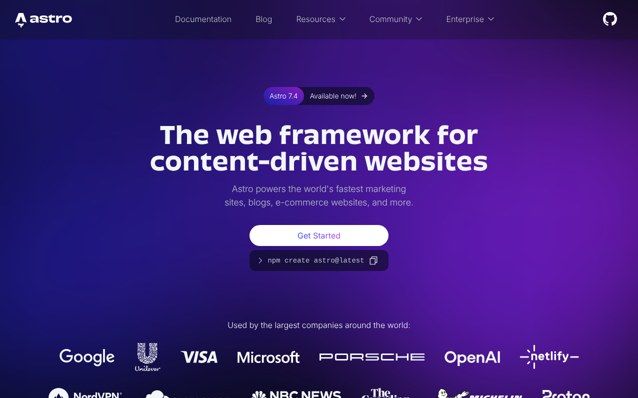
JavaScript on: 984 words
Pros
Full content in the HTML by default, with no configuration.
Fast. In HTTP Archive's Core Web Vitals Technology Report (as reported by Search Engine Journal in May 2026), 67% of Astro sites passed Core Web Vitals, against about 49% of WordPress sites.
Full control over metadata, robots.txt, llms.txt, canonical tags and structured data such as Article Schema and FAQ Schema.
Cons
A developer tool, not a CMS. Editors need a headless CMS or Markdown files to publish.
Heavy app-like features (accounts, dashboards, complex carts) take more work.
Best for: service businesses, agencies, publishers, documentation and any site where content is the product.
Next.js: best for SaaS and apps, if you keep content on the server
How it renders. Next.js can render each route on the server, at build time, or in the browser. In the App Router, components are Server Components by default, so their content is in the initial HTML. Components marked 'use client' render in the browser, so content placed there may not be visible to GPTBot or ClaudeBot.
What AI bots see. In our test, a median of 100%. One more detail: when we requested nextjs.org with GPTBot's user agent, it answered with a clean Markdown version of the page and a link to its llms.txt. It's a sign of where AI-ready sites are heading.
Pros
Server rendering, static generation and incremental regeneration on one framework.
Structured data can be rendered on the server (a <script type="application/ld+json"> in a Server Component), so AI crawlers get it without JavaScript.
Strong for products that mix marketing pages with a logged-in app.
Cons
Easy to get wrong. A useEffect data fetch or a page-wide 'use client' quietly hides content from non-JavaScript bots.
Needs developers. Every content change is a code or headless CMS change.
Ships more JavaScript than Astro, which can weigh on page speed.
Best for: SaaS companies, startups with a product and a marketing site in one codebase, and teams with in-house developers.
WordPress: best for content-heavy sites, if you control the plugins
How it renders. Classic WordPress builds every page on the server with PHP, so content is in the HTML by default. That's why it scored a median of 98% in our test, with the lowest site at 92%.
Pros
About 40% of all websites run on it (W3Techs, October 2026). Every SEO tool, developer and agency knows it.
Built-in AI search features through plugins. Yoast SEO, for example, generates an llms.txt file in its free version with one toggle.
Easy publishing for non-technical teams, with author profiles, internal linking and categories built in. Strong for the topic clusters and steady publishing that build topical authority and AI citations.
Cons
Page speed is the weak spot. About 49% of WordPress sites pass Core Web Vitals, the lowest of the platforms in the HTTP Archive comparison.
Plugins add risk: page builders, sliders, review widgets and JavaScript-only schema plugins can each hide content from AI bots.
Ongoing upkeep: updates, security and hosting quality are on you.
Best for: publishers, content marketing programs, local service businesses and multi-author blogs.
Shopify: best for ecommerce, with a direct line into AI shopping
How it renders. Shopify themes are built with Liquid templates and rendered on Shopify's servers, so product titles, descriptions and structured data are in the HTML. Apps and theme sections often add content with JavaScript, which is why Shopify had the widest spread in our test (22% to 99%).
What AI bots see. The core product facts, like titles, prices and product specifications. The extras (reviews, recommendations, product grids, bundles) are often missing.
Pros
AI shopping built in. Shopify's Agentic Storefronts channel lets merchants sell to ChatGPT users. Shopify Catalog syndicates product data to AI channels including ChatGPT and Microsoft Copilot. Shopify even offers an Agentic plan so brands that don't run their store on Shopify can join the Catalog.
Top-tier speed: about 79% of Shopify sites pass Core Web Vitals.
The default robots.txt lets AI crawlers in. You can customize it with robots.txt.liquid, and since late May 2026 Shopify also supports llms.txt.liquid templates.
Cons
Review and upsell apps often load by JavaScript, so your social proof can be invisible to AI.
Fixed URL structures (/products/, /collections/, /blogs/) and a basic blog engine.
Less control over the HTML than a framework.
Best for: any business that sells physical products online.
Lovable: best for fast launches, but test what crawlers get
How it renders. This changed a lot in 2026. Lovable used to build client-side React single-page apps, which sent crawlers an almost empty HTML shell. Since May 13, 2026, new Lovable projects are server-side rendered with TanStack Start. Older projects keep working and get pre-rendering for crawlers, and they can be upgraded in place. Every Lovable site we tested was already on TanStack Start.
What AI bots see. It depends on how the page was prompted. Three of six sites were 88% or higher, one was 78%, but one was 46% (its Google reviews loaded by JavaScript) and one was 0% (a loading screen).
Pros
Fastest way from idea to a live site, with no developer needed.
Server rendering is now the default for new projects.
Built-in SEO tooling and a one-click SEO review.
Cons
Generated code decides what renders on the server. A "loading" state or client-side data fetch can still hide your content.
Older pre-rendering is served to verified crawlers, so you can't easily check what each AI crawler receives.
Harder to hand over to an editor or an SEO team than a CMS.
Best for: MVPs, campaign and launch pages, and founders validating an idea, as long as you check the output.
What about Webflow, Wix and other builders?
They weren't in our test, but two facts are worth knowing. Cloudflare says Astro already sits underneath platforms like Webflow and Wix that run on its network, and in the same HTTP Archive comparison about 80% of Wix sites passed Core Web Vitals. The same rule applies to any builder: check that your content is in the raw HTML.
Comparison table: AI search readiness by platform
| Astro | Next.js | WordPress | Shopify | Lovable | |
|---|---|---|---|---|---|
| Default rendering | Static HTML + islands | Server Components (per route) | Server (PHP) | Server (Liquid) | Server (TanStack Start, since May 2026) |
| Readable without JS (our median) | 100% | 100% | 98% | 64.5% | 83% |
| Core Web Vitals pass rate* | ~67% | Not in report | ~49% | ~79% | Not in report |
| Structured data | Full control | Full control (server-rendered) | Plugins | Theme + apps | Via prompts/code |
| robots.txt / llms.txt control | Full | Full | Plugin | Liquid templates | Via code |
| Who edits content | Developers / headless CMS | Developers / headless CMS | Anyone | Anyone | Anyone (by prompt) |
| Biggest AI search risk | Editing workflow | 'use client' content | Plugins, speed | JS-loaded apps | Loading states |
| Best for | Content sites | SaaS, apps | Publishers, local | Ecommerce | Fast launches |
*HTTP Archive Core Web Vitals Technology Report, as reported by Search Engine Journal, May 2026.
Decision guide: which platform fits your business?
Local service business (contractor, clinic, law firm): WordPress with a lightweight theme, or Astro if you want speed and have a developer. Make sure reviews and service-area pages are in the HTML, not in a widget.
Ecommerce brand: Shopify. Turn on the AI shopping channels, then check that reviews and key product details aren't only loaded by apps.
SaaS company: Next.js, with all marketing and documentation content in Server Components.
Publisher or content-led brand: Astro or WordPress.
New idea or launch page: Lovable, then run the check below before you invest in content.
Already have a site? Validate before you migrate. A migration is expensive and risky. In our test, the platform alone never guaranteed a good or bad result. Test your current site first. Fixing a few templates is usually cheaper than rebuilding.
How to check what AI crawlers see on your site (5 minutes)
View the source. Open your page, press Ctrl+U (Cmd+Option+U on Mac) and search for a sentence from your main content. If it's not in the source, AI crawlers can't see it.
Turn JavaScript off. In Chrome DevTools, open the command menu, choose "Disable JavaScript" and reload. What's left is roughly what GPTBot reads.
Fetch it like a crawler. Run curl -A "GPTBot" https://yoursite.com in a terminal and check the output for your headline, prices and reviews.
Check your robots.txt. Make sure you aren't blocking OAI-SearchBot, PerplexityBot or ClaudeBot by accident, and check your CDN's bot settings too.
Check your structured data. Manual testing beats assumptions here. Paste your URL into Google's Rich Results Test, then confirm the same JSON-LD is in the page source, not injected by a tag manager.
What your platform can't do for you
Getting read is the entry ticket, not the win. AI engines recommend businesses they can understand and verify. That takes:
Answer-first content structure: lead each page with a direct answer, then the detail, with visible on-page Q&A formatting backed by FAQ Schema.
Specific, checkable facts: prices, service areas, product specifications, comparison tables and original research that AI can quote.
Proof from other places: brand mentions in industry publications, Reddit threads and review platforms, plus case studies on your own site.
Clean basics: descriptive alt text on high-quality images, consistent business information, fast page speed and no broken links.
No platform does that for you, and no one can guarantee what an AI model will say.
What you can do is remove the technical barriers and then measure your AI search visibility over time: your mention and citation rate, your share of voice against competitors, and AI-referred traffic in your analytics and Google Search Console. That's what we do at Foundency: we track the questions your customers ask across ChatGPT, Google AI Overviews and AI Mode, Gemini, Perplexity and more, find where you're missing, and fix both the technical and the content gaps, so AI visibility turns into leads and sales. If you want to see how AI sees your business today, start with a free AI Ranking Audit.
Frequently asked questions
Do AI crawlers read JavaScript?
Mostly no. Vercel and MERJ's crawl-log study found no evidence of JavaScript execution by GPTBot, OAI-SearchBot, ChatGPT-User, ClaudeBot, Meta's crawler or Bytespider, and PerplexityBot is widely reported to work the same way. Google is the exception: Gemini and AI Overviews use Googlebot's rendering.
Which website platform is strongest for AI search visibility?
For pure readability, Astro: 100% of content was in the raw HTML on every Astro site we tested. Next.js and WordPress were close behind. For ecommerce, Shopify's direct AI shopping integrations outweigh its JavaScript gaps, as long as you check your apps.
Is Lovable bad for SEO and AI search?
Not anymore by default. New Lovable projects have been server-rendered since May 13, 2026, and older ones get pre-rendering for crawlers. But we found live Lovable pages that still send AI crawlers only a loading screen, so test every important page.
Do I need an llms.txt file?
It's cheap to add and WordPress (Yoast) and Shopify make it easy, but don't expect much from it yet. Yoast itself notes that no major AI provider officially supports llms.txt. Your HTML, structured data and robots.txt matter far more.
Should I switch platforms to rank in AI search?
Usually not first. Test what AI crawlers see on your current site. Most problems we found came from specific widgets, apps or page templates, not from the platform itself.
Methodology
27 live homepages tested on November 13, 2026. Raw HTML was fetched with GPTBot's user agent and an HTML Accept header; rendered pages were loaded in headless Chrome and measured after the load event plus 4 seconds. Word counts exclude scripts, styles and SVG. Platforms were confirmed from code markers. Sites that blocked or rate-limited the test were excluded.